File Explorer Not Responding: Microsoft is giving users to best user experience programs and when we look at the track record of the Microsoft. Also you can find many apps and updates. Also many time to fix the problem for Windows Update like Windows 10 File Explorer Not Responding also you keep the updates turn on because this helps for you problems for many Software and Apps.
Windows 10 File Explorer Not Responding
However, file explorer not responding problem are faced in many time for Window Update also this are not easy to resolve. Yes, this is very hard to fix also some time people help to Google and find fix this Issue. But you don’t worry here I explain some method to resolve “File Explorer Not Responding.” And try steps by steps that are very easy.
How to Fix Windows 10 File Explorer Not Responding on PC
1#. Open Separate Window
Step 1: First, you open the File Explorer.
Step 2: After, click on “View” at the top.
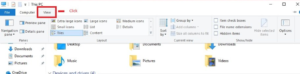
Step 3: Then, you see for “Options” in the left corner.
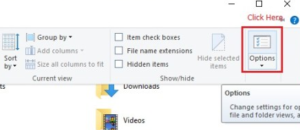
Step 4: Now, click on it.
Step 5: After tab is open now.
Step 6: After, you can see another tab called View.
Step 7: click it.
Step 8: After, you find Launch Folder Window in Separate Process you tick the area.
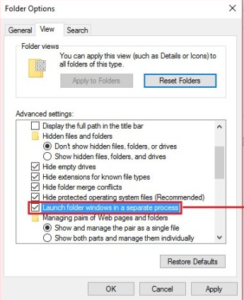
Step 9: Now, Click to Apply.
Step 10: Done.
2#. Control Panel
However, this method is best work to fix “file explorer not responding” Windows 10 users as well check below Steps.
Step 1: First, Go to Control Panel.
Step 2: after, find the “Search Bar“on the top right side of it.
Step 3: after, search bar type “File Explorer”.
Step 4: Now, first result of “File Explorer” and Tap on it.
Step 5: After, you can see above tab pops up on your screen.
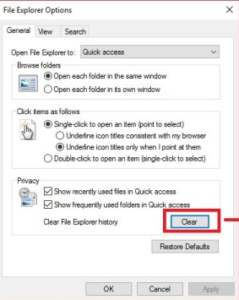
Step 6: After, you can see from you have to use the “Clear” option to delete all previous data.
Step 7: Tap on “Clear“options.
Step 8: Now click on Apply.
Step 9: Done.
Final Words
However, above mentioned all steps for Fix Windows 10 File Explorer Not Responding on PC and I try to resolve your issue in just few steps and easy you can check above. You check steps and follow that is very easy for you.

Thank you for your sharing. I am worried that I lack creative ideas. It is your article that makes me full of hope. Thank you. But, I have a question, can you help me? https://www.binance.bh/register?ref=JW3W4Y3A
Can you be more specific about the content of your article? After reading it, I still have some doubts. Hope you can help me.
Your article helped me a lot, is there any more related content? Thanks! https://www.binance.info/futures/ref?code=IXBIAFVY
Bleach porn hentai for freeBreast cancer edmonton walkGay cruise
forest guerneville californiaBig breasted sororityAverage xxxNude senseiSara jay dp both analAdult female submissiveAnime
bleach orihime sexLesbian force fuck xnxx Pessing black assJessica simpson shaking ass videoMistress strap on bdsm forced biLesbians in sexy
see through pantiesRunaway nudesCollege sluts getting fuckedDanger service agency hentaiKim
kardishian and sex and videoWomen amature older
sex moviesFree amutaer hot sexy women https://xnxxvids.cc/ Big hard sex teenVintage pfaltzgraffBottled piss for
saleNew hampshire active adult communitiesAfro ashley gibbs
head marie movie slutDisney hard xxxSex scene in southland talesBig tit granny picsBest black amateur xnxx London u k porn theatreGabrielle anwar nude oops picsShow me your
young cockMariska hargitay hot nudeFull erotic
love moviesAdult ninja turtle sleep pantsFord escort power window switchBest
ass internetPalm springs gay party
Hi, Neat post. There is a problem with your web site in internet explorer, would check this? IE still is the market leader and a big portion of people will miss your magnificent writing because of this problem.
Your point of view caught my eye and was very interesting. Thanks. I have a question for you. https://www.binance.com/futures/ref?code=IXBIAFVY
Your article helped me a lot, is there any more related content? Thanks! https://accounts.binance.bh/register/person?ref=QCGZMHR6