How to turn on Bluetooth on windows 10 and how? Here all steps available to fix this. Now connect your Bluetooth device after transfer files from iPhone to PC via Bluetooth, First you need to turn on Bluetooth on Windows 10. You check below steps that are best for you.
How to Turn on Bluetooth on Windows 10
However, you faced problem for “How to turn on Bluetooth on windows 10” so, don’t worry you follow easy steps now.
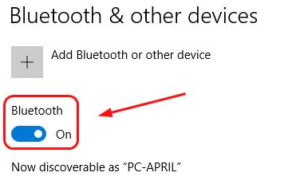
Step 1: Go to your Computer keyboard.
Step 2: After, hold down the Windows logo key.
Step 3: After, Tap to open the Settings window.
Step 4: Click on Devices.
Step 5: Then, Tap on switch turn on Bluetooth.
Step 6: Done.
Now, you not see the switch so, that is problem with Bluetooth on your computer. So, you first follow below steps for how to fix Bluetooth on your Windows 10.
How to do if not turn on Bluetooth on Windows 10
Here, much way to fix Bluetooth problem on Windows 10 but I explain 3 best ways to fix Turn on Bluetooth on Window 10. Also you check this problem and find it.
1#. Your computer support Bluetooth, check it
Step 1: First, Go to your computer.
Step 2: After, right click on Start button to open Device Manager.
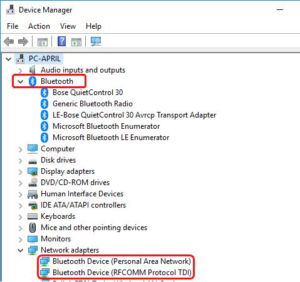
Step 3: Then, check to see if Bluetooth section or any Bluetooth adapter located on Network adapters section.
Step 4: The Bluetooth adapter listed under the other devices option to some errors.
Step 5: Now, you not find Bluetooth adapter in Device Manager after not supported Bluetooth device on Window 10.
2#. Update the Bluetooth driver
When you are agreeing to supports Bluetooth in your computer but not working, so you go update your Bluetooth driver.
Now, you choose manually update the driver after you go computer manufacturer site and search Bluetooth driver. And other option you choose like automatically Driver Update for your computer. You are download it after install it, follow below Steps.
Step 1: First, Download run Driver Easy.
Step 2: Then, Install now.
Step 3: Tap on Click Scan.
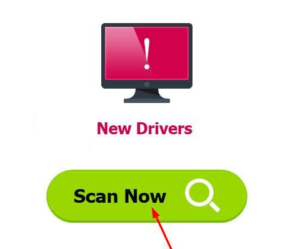
Step 4: After, you detect your computer driver problem.
Step 5: After, you can manually install it.
Step 6: Also you use Pro version you can click Update to automatically download and install Driver.
Step 7: After, Restart computer.
Step 8: Then, open the Settings window.
Step 9: After, you see the button switch Bluetooth on now.
Step 10: Done.
3#. Re-enable to the Bluetooth driver software in Device Manager
Step 1: First, Right click on the Start button.
Step 2: After then, choose Device Manager.
Step 3: After, Right click on Bluetooth device.
Step 4: And select Disable device.
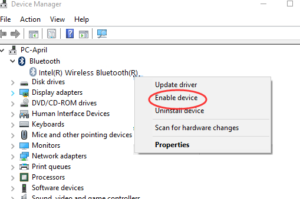
Step 5: After, click on device again and click Enable device.
Step 6: Done after you check Repeated your option see.
Final Words
However, above mentioned all Steps for How to Turn on Bluetooth on Windows 10 and you follow above steps that is very easy for you.

Veery good sijte yoou haqve here bbut I wass cuious aabout iif you kneww off anyy user discussikn forms that ccover tthe sam topiics talkked about inn thiis article?
I’d reallky ove tto be a pazrt oof online commhnity wher I can gett commnents from other knowledgeable individuals
hat sharre thee sae interest. If you hav aany recommendations, please
llet mme know. Thhank you! xnxx
На нашем портале есть возможность встретить множество познавательных данных.
На страницах ресурса размещены многочисленные тексты на важные направления.
Каждый пользователь имеет возможность изучить много полезного и пополнить свой кругозор.
Публикации постоянно пополняются, дабы пользователи неизменно имели доступ к наиболее свежей базе.
https://sakhaday.ru/news/psihologicheskiy-test-kakoe-slovo-vy-uvideli-pervym
Thanks for sharing. I read many of your blog posts, cool, your blog is very good. https://accounts.binance.bh/register/person?ref=GGYHGRE
Greate pieces. Keep posting such kind of info on your page. Im really impressed by it.
Hey I know this is off topic but I was wondering if you knew of any widgets I could add to my blog that automatically tweet my newest twitter updates. I’ve been looking for a plug-in like this for quite some time and was hoping maybe you would have some experience with something like this. Please let me know if you run into anything. I truly enjoy reading your blog and I look forward to your new updates.
Термоизоляция несёт критическую задачу в удержании комфортной температуры внутри здания.
Качественная защита помогает заметно уменьшить расходы на обогрев и кондиционирование помещений.
https://jaguar-online.ru/auto/471-murmanskie-zheleznodorozhniki-pobili-rekord-za-mesyats-razgruzili-svyshe-36-tys-vagonov/
Кроме того, утепление препятствует образование влаги, плесени и промерзания стен.
Таким образом, правильная изоляция создаёт энергоэффективность и уютный климат в здании.
Каталог Vavada собрал более пяти тысяч слотов от ведущих провайдеров индустрии, включая NetEnt, Pragmatic Play, Play’n GO и Nolimit City. Автовывод списывает накопленные выигрыши на карту или e-wallet по заданному расписанию без ручной подачи заявки. Все детали доступны по адресу: https://vavada-air.com Такая работа с сообществом формирует ощущение живого проекта, где мнение аудитории учитывается в продуктовых решениях.
May I simply just say what a relief to find a person that genuinely understands what they are talking about on the internet. You actually realize how to bring a problem to light and make it important. More people have to check this out and understand this side of your story. I can’t believe you are not more popular since you certainly possess the gift.
Thank you for your sharing. I am worried that I lack creative ideas. It is your article that makes me full of hope. Thank you. But, I have a question, can you help me? https://www.binance.bh/register?ref=JW3W4Y3A
May I simply say what a relief to find someone who truly knows what they are discussing on the net. You definitely know how to bring an issue to light and make it important. More people must read this and understand this side of your story. I was surprised you’re not more popular since you surely have the gift.
Wow that was unusual. I just wrote an incredibly long comment but after I clicked submit my comment didn’t appear. Grrrr… well I’m not writing all that over again. Anyways, just wanted to say great blog!
Hey I know this is off topic but I was wondering if you knew of any widgets I could add to my blog that automatically tweet my newest twitter updates. I’ve been looking for a plug-in like this for quite some time and was hoping maybe you would have some experience with something like this. Please let me know if you run into anything. I truly enjoy reading your blog and I look forward to your new updates.
Can you be more specific about the content of your article? After reading it, I still have some doubts. Hope you can help me.
Can you be more specific about the content of your article? After reading it, I still have some doubts. Hope you can help me.
Thanks for sharing. I read many of your blog posts, cool, your blog is very good. https://www.binance.bh/futures/ref?code=IXBIAFVY
Wow that was unusual. I just wrote an really long comment but after I clicked submit my comment didn’t appear. Grrrr… well I’m not writing all that over again. Regardless, just wanted to say fantastic blog!
Wow that was strange. I just wrote an incredibly long comment but after I clicked submit my comment didn’t appear. Grrrr… well I’m not writing all that over again. Anyhow, just wanted to say superb blog!
Hello there, You have done a fantastic job. I will definitely digg it and personally suggest to my friends. I am confident they’ll be benefited from this website.
Aw, this was an exceptionally good post. Finding the time and actual effort to make a superb article… but what can I say… I put things off a lot and never manage to get nearly anything done.
Greate article. Keep posting such kind of info on your site. Im really impressed by your blog.
Excellent post. Keep writing such kind of info on your site. Im really impressed by your blog.
Right now it sounds like Expression Engine is the best blogging platform available right now. (from what I’ve read) Is that what you are using on your blog?
At this time it looks like Expression Engine is the preferred blogging platform available right now. (from what I’ve read) Is that what you are using on your blog?
https://jm-rencontres.fr/
Incredible! This blog looks exactly like my old one! It’s on a entirely different subject but
it has pretty much the same page layout and
design. Superb choice of colors!
Hello there, You’ve performed an incredible job. I will definitely digg it and for my part recommend to my friends. I’m sure they will be benefited from this website.
May I simply say what a comfort to uncover an individual who truly knows what they are talking about on the net. You definitely know how to bring an issue to light and make it important. More and more people should read this and understand this side of your story. I was surprised that you are not more popular since you certainly possess the gift.
Excellent pieces. Keep writing such kind of info on your blog. Im really impressed by it.
Thank you for your sharing. I am worried that I lack creative ideas. It is your article that makes me full of hope. Thank you. But, I have a question, can you help me?
Can I simply say what a comfort to find a person that truly knows what they’re talking about over the internet. You definitely understand how to bring a problem to light and make it important. More and more people have to read this and understand this side of your story. I can’t believe you aren’t more popular because you surely possess the gift.
Excellent pieces. Keep posting such kind of information on your page. Im really impressed by your blog.
At this time it sounds like Expression Engine is the best blogging platform available right now. (from what I’ve read) Is that what you are using on your blog?
USB-флешку 2 ГБ и красивые USB-накопители мужчинам в Твери. Шоколадную плитку с фирменным знаком цена и шопперы оптовыми партиями в Красноярске. Флеш-накопитель 128 Gb и гравировка с флешки в ближайшем офисе в Смоленске.
https://usb-flashki-optom-24.ru/
Greate pieces. Keep writing such kind of information on your blog. Im really impressed by your site.